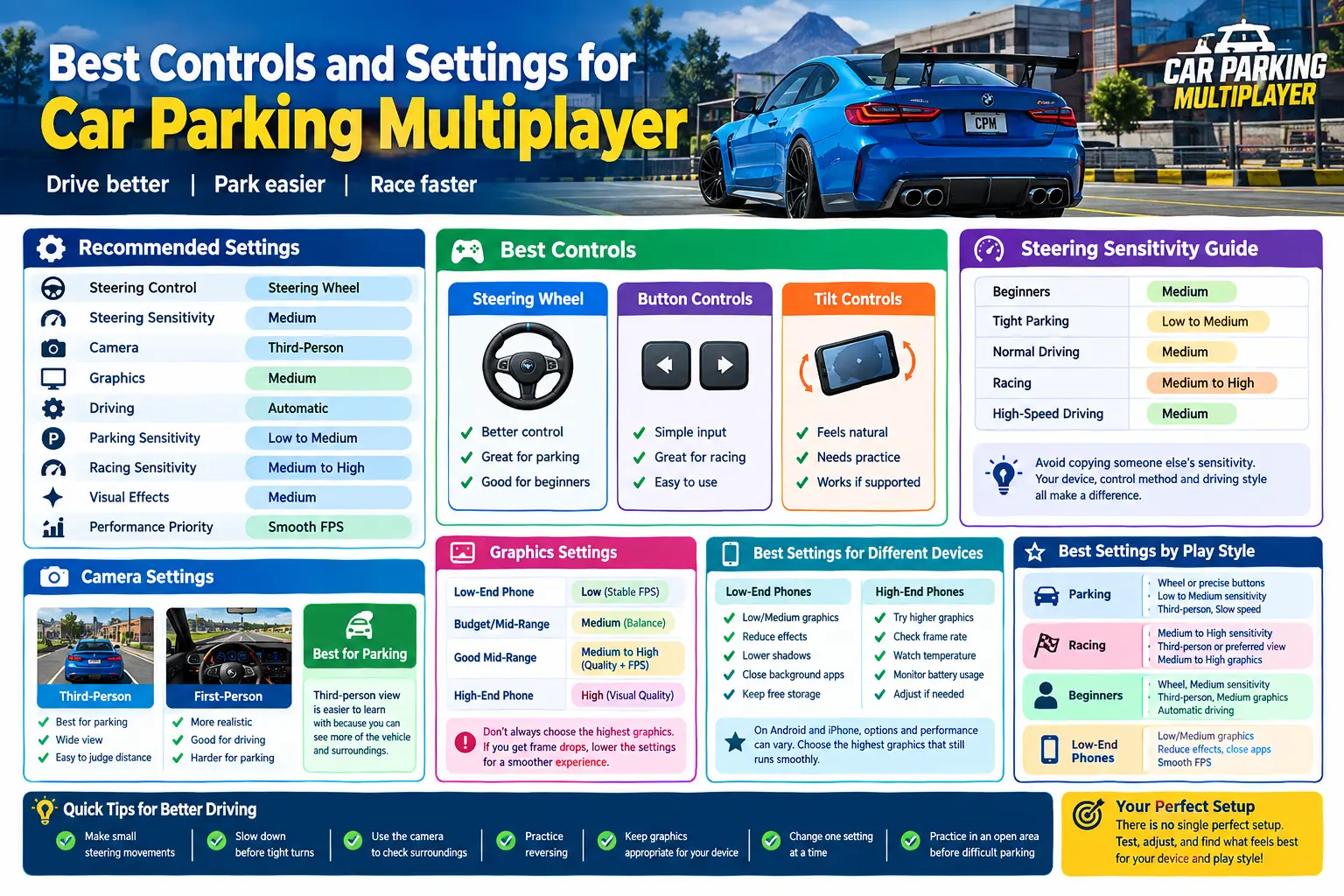
Best Controls and Settings for Car Parking Multiplayer
Finding the best controls and settings for Car Parking Multiplayer can make driving, parking, racing, and everyday gameplay much easier. If you are new to the game, you can also visit our Car Parking Multiplayer to explore the main game features, versions, and useful resources.
The default setup may work well for some players, but adjusting steering sensitivity, camera view, graphics, and driving controls can make the game feel more comfortable and responsive.
There is no single setup that is perfect for everyone. A player who mainly parks cars may prefer lower steering sensitivity and a wider camera view, while someone who enjoys racing may prefer quicker steering responses.
In this guide, you will find recommended Car Parking Multiplayer controls, sensitivity, camera, graphics, and performance settings for beginners, parking, racing, low-end phones, and high-end devices.
Recommended Car Parking Multiplayer Settings
If you are not sure where to start, use this balanced setup as a baseline:
| Setting | Recommended Starting Point |
|---|---|
| Steering Control | Steering Wheel |
| Steering Sensitivity | Medium |
| Camera | Third-Person |
| Graphics | Medium |
| Driving | Automatic |
| Parking Sensitivity | Low to Medium |
| Racing Sensitivity | Medium to High |
| Visual Effects | Medium |
| Performance Priority | Smooth FPS |
These settings are only a starting point. After playing for a while, make small adjustments based on your device and driving style.
Best Controls for Car Parking Multiplayer
Your control method can have a noticeable effect on how easy it is to steer, park, reverse, and race.
Steering Wheel
The steering wheel is a good starting choice if you want more controlled steering movements.
It can work particularly well for:
- Parking in tight spaces
- Slow driving
- Making precise turns
- Driving around traffic
- Learning accurate steering
For beginners, medium sensitivity is a good place to start. Extremely high sensitivity can make the car difficult to control, especially during parking.
Button Controls
Button controls can be useful if you prefer simple left and right inputs instead of a virtual steering wheel.
They can work well for:
- Casual driving
- Quick direction changes
- Racing
- Players who prefer simple controls
If you regularly oversteer with the steering wheel, try button controls and compare how both methods feel.
Tilt Controls
If tilt controls are available in your version and supported by your device, you can use your phone’s movement to steer.
Tilt controls can feel natural once you get used to them, but they usually require more practice than buttons or a steering wheel.
Best Steering Sensitivity for Car Parking Multiplayer
Car Parking Multiplayer sensitivity controls how quickly your vehicle responds to steering movements.
If sensitivity is too high, a small movement can turn the car too sharply. If it is too low, the steering may feel slow and require larger movements.
For most players, medium sensitivity is a good starting point.
| Situation | Recommended Sensitivity |
|---|---|
| Beginners | Medium |
| Tight Parking | Low to Medium |
| Normal Driving | Medium |
| Racing | Medium to High |
| High-Speed Driving | Medium |
For parking, lower sensitivity can make small steering corrections easier. For racing, slightly higher sensitivity may help with faster direction changes.
However, avoid copying another player’s exact sensitivity. Screen size, control method, vehicle handling, and personal preference can all affect how a setting feels.
Best Camera Settings
A suitable camera view can make it easier to judge your vehicle’s position and distance from other objects.
Third-Person Camera
For many beginners, third-person view is a strong starting choice because it provides a wider view of the vehicle and surroundings.
It can be useful when:
- Parking
- Reversing
- Making tight turns
- Driving through narrow areas
- Checking the position of your car
First-Person Camera
First-person view provides a more realistic driving perspective.
It can be enjoyable for normal road driving, but parking may require more practice because judging the distance between your car and nearby objects can be more difficult.
Best Camera for Parking
For parking, third-person view is generally easier to learn with because you can see more of the vehicle and its surroundings.
Once you become comfortable, you can switch between camera views depending on the situation.
Best Graphics Settings for Car Parking Multiplayer
The best graphics settings depend on your phone’s hardware and how smoothly the game runs.
Higher graphics can improve visual quality, but they can also put more load on your device. If you notice stuttering, frame drops, or overheating, reducing graphics can provide a better overall experience.
Recommended Graphics by Device
| Device Type | Recommended Graphics | Main Priority |
|---|---|---|
| Low-End Phone | Low | Stable FPS |
| Budget/Mid-Range | Medium | Balance |
| Good Mid-Range | Medium to High | Quality + FPS |
| High-End Phone | High | Visual Quality |
Do not automatically choose the highest graphics option. If high graphics cause frame drops, medium settings may give you a smoother and more enjoyable experience.
Best Settings for Low-End Phones
If you are using an older or budget phone, performance should usually be your main priority.
Try these adjustments:
- Use low or medium graphics
- Reduce visual effects if available
- Lower shadows if the option is available
- Reduce resolution if supported
- Close unnecessary background apps
- Keep enough free storage on the device
- Avoid playing while the phone is extremely hot
If the current version does not perform well on your device, an earlier release may sometimes be worth checking for compatibility. You can explore the Car Parking Multiplayer Old Version to compare available older versions.
Stable FPS is usually more useful than maximum graphics quality when your goal is smooth driving and responsive controls.
Best Settings for High-End Phones
A powerful phone can generally handle higher graphics settings more comfortably.
You can start with higher graphics and then check:
- Frame rate
- Device temperature
- Battery usage
- Stuttering
- Control responsiveness
If everything remains smooth, you can keep the higher settings. If performance becomes unstable, reduce individual graphics options instead of lowering everything at once.
Android vs iPhone Settings
Car Parking Multiplayer can feel different depending on the device, even when players use similar settings.
On Android phones, graphics and performance can vary significantly between different hardware configurations. On iPhone and iPad, the available options and performance can also depend on the device and game version.
If you play on iOS, you can also check our Car Parking Multiplayer iOS page for iOS-specific information and version details.
The same general rule applies to both platforms: choose the highest graphics level that still provides smooth and responsive gameplay.
Best Controls for Parking
Parking requires more precision than normal driving. A setup that feels comfortable during racing may not be ideal when you need to fit a car into a tight space.
Try this setup for parking:
| Setting | Parking Recommendation |
|---|---|
| Steering | Wheel or Precise Buttons |
| Sensitivity | Low to Medium |
| Camera | Third-Person |
| Speed | Slow |
| Steering Movement | Small Adjustments |
| Braking | Early and Controlled |
When parking between two vehicles, avoid holding the steering control for too long. Make small adjustments and use the camera to check your position before continuing.
Parking Tip
If the front of your car moves too far toward one side, stop making large steering movements. Straighten the steering gradually and reposition the vehicle before moving again.
Slow and controlled inputs are usually easier to manage than sudden movements.
Best Controls for Racing
Racing requires quicker reactions than parking.
A useful starting setup is:
- Steering sensitivity: Medium to High
- Camera: Third-Person or your preferred racing view
- Graphics: Medium or High if your device can handle it
- Driving: Automatic for beginners
- Steering: Small, quick corrections
Avoid setting sensitivity extremely high simply because you want faster steering. Over-sensitive controls can make it harder to keep your car stable at high speed.
Automatic vs Manual Controls
Automatic controls are generally easier for beginners because you can focus more on steering, braking, acceleration, and vehicle positioning.
Manual controls may suit experienced players who want more direct control over the driving process when those options are available.
Which Should You Use?
Beginners: Start with automatic controls.
Experienced players: Try manual controls if you want more direct control.
There is no universal winner. The better option is the one that allows you to control the vehicle comfortably and consistently.
Best Settings for Beginners
If you are new to Car Parking Multiplayer, avoid changing too many settings at once.
Start with:
- Steering wheel
- Medium sensitivity
- Third-person camera
- Medium graphics
- Automatic driving
- Smooth and controlled acceleration
Play for a while and learn how your vehicle responds before making further adjustments.
Once you become comfortable, change sensitivity or graphics based on what you actually notice during gameplay.
How to Find Your Perfect Car Parking Multiplayer Settings
There is no single setup that works perfectly for every player. The easiest way to find your ideal settings is to make small changes and test them.
1. Choose Your Control Method
Start with the steering wheel or buttons. Use the option that feels easiest to control.
2. Set Sensitivity to Medium
Medium sensitivity gives you a balanced starting point for normal driving.
3. Select Third-Person Camera
Use third-person view while learning parking, reversing, and vehicle positioning.
4. Choose Graphics According to Your Device
Prioritize smooth gameplay rather than maximum visual quality.
5. Test the Settings in an Open Area
Drive, turn, brake, reverse, and make a few tight turns.
6. Change One Setting at a Time
This helps you understand which adjustment actually improves your gameplay.
7. Practice Parking
If steering feels too sharp, lower the sensitivity. If it feels too slow, increase it slightly and test again.
If you want to explore newer changes before settling on your preferred setup, you can also check our Car Parking Multiplayer Beta Version page.
Common Control Problems and Fixes
My Car Turns Too Quickly
Lower the steering sensitivity and use smaller steering movements. Test the change before making another adjustment.
My Car Turns Too Slowly
Increase sensitivity slightly. Avoid making a large increase because the car may become difficult to control.
Parking Feels Difficult
Try third-person camera, lower sensitivity, and slower driving. Make small steering corrections instead of turning aggressively.
The Game Is Lagging
Lower graphics quality and visual effects, close unnecessary background apps, and avoid playing while your phone is overheating.
The Camera Feels Uncomfortable
Try another camera view. Third-person can provide better vehicle visibility, while first-person may feel more natural for realistic driving.
Controls Feel Delayed
Check for FPS drops, overheating, and background apps using device resources. Performance problems can make controls feel less responsive.
Best Overall Setup for Most Players
If you simply want one balanced setup to try, start here:
Steering: Steering Wheel
Sensitivity: Medium
Camera: Third-Person
Graphics: Medium
Driving: Automatic
Parking: Low to Medium Sensitivity
Racing: Medium to High Sensitivity
Priority: Smooth FPS and Responsive Controls
After playing for a few sessions, adjust the settings based on your own experience.
Tips for Better Driving and Parking
Good settings can help, but driving technique is equally important.
Keep these tips in mind:
- Make small steering movements.
- Slow down before tight turns.
- Use the camera to check your surroundings.
- Practice reversing.
- Avoid unnecessarily high sensitivity.
- Keep graphics appropriate for your device.
- Prioritize smooth FPS over maximum visual quality.
- Change one setting at a time.
- Practice in an open area before attempting difficult parking spots.
- Learn how your vehicle responds before making aggressive steering movements.
FAQ
What are the best controls for Car Parking Multiplayer?
A steering wheel with medium sensitivity is a good starting setup for many beginners. Button controls can also work well if you prefer simple left and right inputs.
What is the best sensitivity for Car Parking Multiplayer?
Medium sensitivity is a good starting point for normal driving. Low to medium sensitivity can make precise parking easier, while medium to high sensitivity may suit racing.
What is the best camera for Car Parking Multiplayer?
Third-person camera is generally a strong starting choice for beginners because it provides a wider view of the vehicle and surrounding area.
What are the best graphics settings for Car Parking Multiplayer?
Medium graphics provide a useful balance for many devices. Low settings are better when performance is the priority, while high settings can be used on capable devices if the game remains smooth.
How do I reduce lag in Car Parking Multiplayer?
Lower graphics and visual effects, close unnecessary background apps, avoid overheating your phone, and keep enough free storage available. If performance remains poor, check whether your device meets the requirements of the current version.
Are automatic controls better than manual controls?
Automatic controls are usually easier for beginners because they reduce the amount of driving input you need to manage. Experienced players may prefer manual controls for more direct control.
Can changing sensitivity improve parking?
Yes. Lower or medium sensitivity can make small steering corrections easier, which can help when parking in tight spaces.
Should I use high graphics on a powerful phone?
You can try high graphics if your device can maintain smooth performance. If you notice frame drops, overheating, or delayed controls, lowering the graphics settings may provide a better experience.
Conclusion
The best controls and settings for Car Parking Multiplayer depend on your device, control method, and driving style. For most beginners, a steering wheel, medium sensitivity, third-person camera, balanced graphics, and automatic driving are a strong starting point.
For parking, use slower speeds and lower sensitivity for more precise movements. For racing, slightly higher sensitivity can provide quicker steering responses. If your phone struggles with performance, lower the graphics and prioritize stable FPS.
The best setup is ultimately the one that feels comfortable and keeps your car easy to control. Test one setting at a time, practice regularly, and build your own setup around the way you play.