
Car Parking Multiplayer Beta Version 2026: How to Join and Try New Features
Car Parking Multiplayer Beta Version gives players a chance to test selected game changes before they become part of a regular public release. Depending on the available testing build, these changes may include new cars, map updates, vehicle physics adjustments, events, gameplay improvements, or bug fixes.
However, beta access is not always open, and the features available can change between builds. If you want to try the latest testing version, the first step is to check whether an official beta program is currently available for your device.
In this guide, you will learn how to check for Car Parking Multiplayer beta access, understand the differences between beta and stable versions, avoid unofficial downloads, and report problems during testing.

Car Parking Multiplayer Beta Version at a Glance
| Information | Details |
|---|---|
| Game | Car Parking Multiplayer |
| Developer | olzhass |
| Category | Simulation and driving |
| Beta availability | Depends on the current testing program |
| Android access | Check official Google Play beta availability |
| iPhone and iPad access | Depends on the developer’s current testing arrangements |
| Main purpose | Test changes and provide feedback |
| Stable version | Regular public release |
Important: A beta build does not necessarily contain every upcoming feature. Always check the specific version and its official announcement before installing it.
What Is Car Parking Multiplayer Beta Version?
Car Parking Multiplayer Beta is a testing build that may allow eligible players to experience selected changes before a wider release.
The regular game includes open-world driving, multiplayer activities, vehicle customization, car trading, voice chat, parking challenges, and other driving features. Depending on the testing build, developers may use beta releases to evaluate changes to these systems.
For example, a testing version might introduce revised vehicle handling, new customization options, a different map area, or fixes for existing gameplay problems. These are examples of possible changes, not a guarantee that every beta includes them.
Beta testing also helps identify problems that may not appear during internal testing. Player feedback can help developers understand how changes behave on different devices and in real multiplayer sessions.
If you prefer a more predictable gameplay experience, the stable version is generally the better choice.

What’s New in the Latest Car Parking Multiplayer Beta?
The changes included in a beta depend on the specific build released for testing. Before installing it, check the developer’s announcement or the available testing information to understand what has actually changed.
New Cars and Vehicle Customization
A beta build may include new vehicles or adjustments to existing cars. Possible changes include vehicle appearance, tuning options, handling, suspension, or other customization features.
If a new car is mentioned in an official announcement, check whether it is available in the particular build you can access. Do not assume that a vehicle shown in promotional material is already available to every player.
New Maps and Locations
Some updates may change existing areas or introduce new locations to explore. Depending on the build, players may be able to test map adjustments, additional environments, or improvements to existing locations.
Explore the available areas and check for visual problems, missing objects, or unexpected gameplay behavior.
Events and Gameplay Changes
Testing builds may also contain changes to events, driving activities, multiplayer systems, or other gameplay features.
The exact content can differ between releases. A feature introduced during testing may be adjusted, delayed, or removed before it reaches the regular version.
Bug Fixes and Performance Improvements
Beta testing can help developers evaluate fixes for crashes, connection problems, graphics glitches, vehicle physics, and other issues.
However, a beta is not automatically faster or more stable than the public release. Testing builds can introduce new problems while existing issues are being fixed.
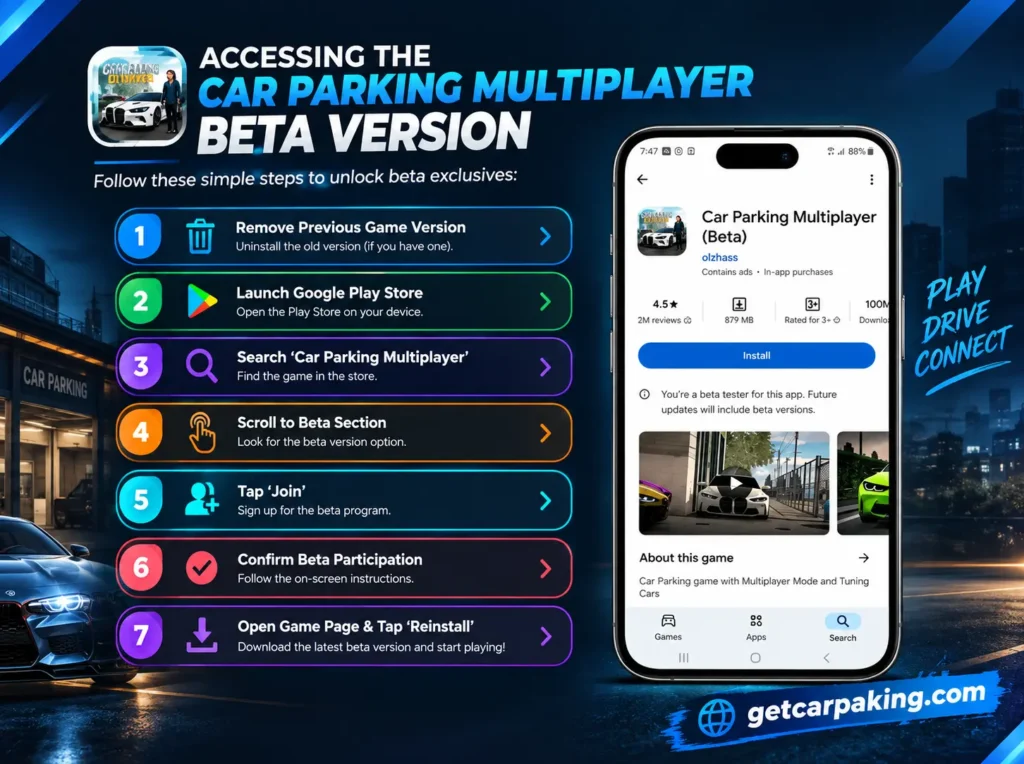
How to Join Car Parking Multiplayer Beta on Android
If you want to try the Android beta, start by checking the official Google Play listing. Beta enrollment depends on whether the developer currently offers a testing program and whether places are available.
Step 1: Open Google Play Store
Open the Google Play Store on your Android phone or tablet and make sure you are using the Google account associated with your game.
Step 2: Find the Official Game Listing
Search for Car Parking Multiplayer and check that the listing corresponds to the game published by olzhass.
You can use the official listing here:
Car Parking Multiplayer on Google Play
Step 3: Check for a Beta Option
Open the game’s listing and look for a beta enrollment option. Depending on the current program, Google Play may display testing information or an option to join.
If you do not see a beta option, the developer may not currently be offering public enrollment through your account or the program may be unavailable.
Step 4: Join the Testing Program
If an official enrollment option is available, follow the instructions displayed by Google Play and confirm your participation.
Do not assume that a third-party website offering a beta APK is connected to the official testing program.
Step 5: Install or Update the Available Build
After enrollment, follow the instructions on Google Play to access the testing build if one is available.
Check the displayed app information before installing it. Keep in mind that beta availability and installation options may change.
Step 6: Test the Game
Open the game and explore the features included in that build. Pay attention to vehicle handling, graphics, controls, multiplayer connectivity, and any newly announced changes.
Step 7: Report Problems
If you encounter a crash, glitch, or connection issue, record the details and submit feedback through the available official testing or support channel.
For general instructions on joining Android beta programs, see Google Play’s official beta testing guide.
How to Get Car Parking Multiplayer Beta on iPhone and iPad
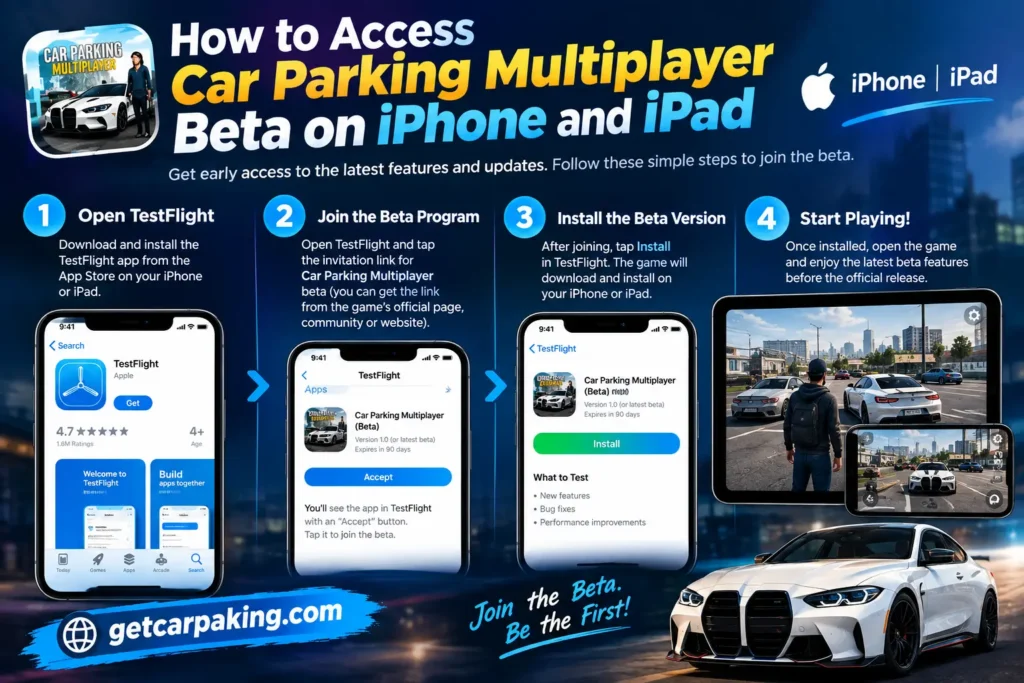
iOS beta access depends on the developer’s current testing arrangements. Apple provides TestFlight for distributing beta versions of apps, but an active invitation or testing opportunity must be available.
If the developer offers a Car Parking Multiplayer beta through TestFlight, follow these steps.
- Check the developer’s official announcements for an active iOS beta invitation.
- Install TestFlight from the App Store if required.
- Open the official invitation link provided by the developer.
- Review the available testing information and accept the invitation if eligible.
- Install the beta build through TestFlight if access is granted.
- Open the game and test the available changes.
- Submit feedback through the testing tools provided.
You can learn more about Apple’s process through the official TestFlight website.
If there is no active invitation or the testing program is unavailable, you may need to wait for another opportunity. Do not assume that an Android beta APK can be installed on an iPhone.
For regular iOS gameplay, visit the official Car Parking Multiplayer App Store listing.
Car Parking Multiplayer Beta vs Stable Version
| Feature | Beta Version | Stable Version |
|---|---|---|
| Main purpose | Test changes and collect feedback | Regular gameplay |
| New features | May include experimental changes | Includes features released to the public |
| Stability | May contain unexpected issues | Intended for normal use |
| Updates | Depends on the testing schedule | Follows the public release schedule |
| Access | May be limited or unavailable | Available through the regular store listing |
| Progress | Compatibility between builds is not guaranteed | Intended for normal ongoing play |
The main difference is the purpose of each release. A beta is used to evaluate changes, while the stable version is intended for players who want a regular gaming experience.
Choose the beta if you want to test available changes and are comfortable with possible bugs. Choose the stable version if reliability and consistent gameplay are more important to you.
Things to Know Before Installing the Beta
🐞 Beta Builds May Contain Bugs
Crashes, visual glitches, connection issues, and unexpected vehicle behavior can occur during testing. If you rely on the game for regular multiplayer sessions, consider staying on the stable release.
🔄 Features Can Change
A feature shown in a testing build may be modified or removed before the public release. Treat announced features as planned or experimental unless the developer confirms their final availability.
💾 Protect Your Game Progress
Do not assume that progress, vehicles, purchases, or other game data will transfer perfectly between testing and stable builds. Follow the developer’s instructions and check whether your account progress is synchronized before making changes.
Avoid uninstalling your existing game or switching between builds without understanding the potential consequences for saved data.
🔓 Check Device Compatibility
Make sure your device meets the requirements shown in the official store listing. An update may also require additional free storage for downloading and installing files.
📦 Use Official Download Sources
Unofficial APK files can be outdated, modified, or unsafe. Prefer the official Google Play listing for Android and the official App Store or developer-provided TestFlight invitation for iOS.
⏳ Beta Access May Close
Some testing programs have limited places or temporary enrollment windows. If you cannot join, check again later or follow official announcements for future testing opportunities.
How to Report Bugs in Car Parking Multiplayer Beta
Reporting problems clearly can help developers understand what needs attention. If you encounter an issue, follow these steps.
🔎 Step 1: Describe the Problem
Explain what happened and where it occurred. For example, a car might behave unexpectedly after tuning, or the game might disconnect during multiplayer gameplay.
📱 Step 2: Record Your Device Information
Include your device model, operating system version, and beta build number if available.
📸 Step 3: Capture Evidence
Take a screenshot or record a short video if it helps demonstrate the issue. Avoid sharing personal information in screenshots.
🔄 Step 4: Explain How to Reproduce the Issue
List the actions that caused the problem. For example:
- Open the game.
- Enter the relevant game mode.
- Select a vehicle.
- Perform the action that triggers the issue.
- Describe the result and what you expected to happen.
📤 Step 5: Submit Your Feedback
Use the feedback option available through the testing program or contact the developer through an official support channel.
A useful bug report includes the problem, device information, build details, steps to reproduce it, and supporting evidence when available.
Tips for Testing Car Parking Multiplayer Beta
- Test announced changes: Focus on the features included in the current build instead of assuming every update contains new content.
- Try different vehicles: If vehicle physics or tuning has changed, compare how different cars behave.
- Explore available locations: Look for map issues, missing objects, and unexpected visual problems.
- Check multiplayer functionality: If multiplayer changes are included, test connections and interactions where possible.
- Monitor performance: Notice unusual loading times, crashes, overheating, or control problems.
- Keep useful notes: Record the build number and steps that reproduce an issue.
- Check for updates: Testing builds may receive further changes or fixes during the testing period.
Frequently Asked Questions
Is Car Parking Multiplayer Beta Version free?
Beta enrollment does not necessarily require a separate purchase, but availability depends on the developer’s testing program. Normal game purchases or in-app purchases may still apply.
How do I join the Car Parking Multiplayer beta on Android?
Open the official Google Play listing and check whether a beta enrollment option is available. If it appears, follow the instructions to join and install the available testing build.
Is Car Parking Multiplayer beta available on iPhone?
Availability depends on the developer’s current iOS testing arrangements. If an official TestFlight invitation is offered, eligible users can follow the invitation instructions to access the build.
Why can’t I find the beta option on Google Play?
The developer may not currently offer public enrollment, the testing program may be full, or the option may not be available for your account. Check the official listing and announcements for updated information.
Is the beta version better than the stable version?
Not necessarily. A beta may provide earlier access to selected changes, but it can also contain bugs or incomplete features. The stable version is generally the better choice for regular gameplay.
Can I lose my progress when using a beta?
Changes between builds can affect compatibility, so you should not assume that progress will always transfer unchanged. Check the developer’s instructions and protect your account before switching versions.
Will every beta feature appear in the official release?
No. Developers may modify, delay, or remove features after testing them. Only treat a feature as part of the public release when its availability is confirmed.
Can I download Car Parking Multiplayer beta from a third-party APK website?
Third-party sites may offer files that are not part of the official testing program. For safer access, use Google Play or another distribution method explicitly provided by the developer.
Conclusion
Car Parking Multiplayer Beta Version can be useful for players who want to test available changes and provide feedback before a wider release. Depending on the testing build, changes may involve vehicles, maps, gameplay systems, performance, or bug fixes.
To access the beta, check the official Google Play listing for Android or the developer’s official announcements for iOS testing opportunities. If no enrollment option or invitation is available, wait for an official opportunity rather than relying on an unverified download.
If you prefer fewer unexpected problems and a more consistent gaming experience, the stable version remains the practical choice for regular gameplay.