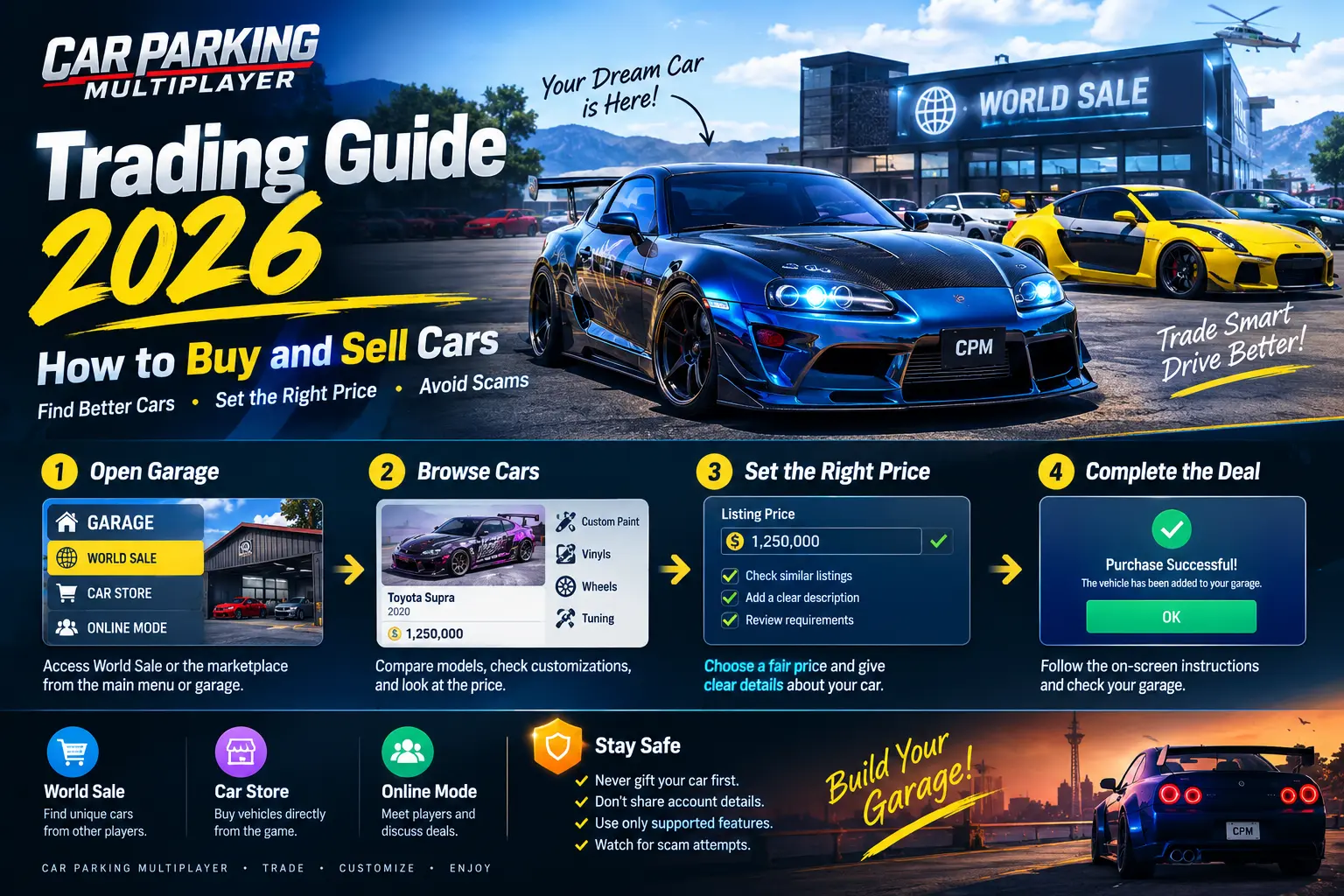
Car Parking Multiplayer Trading Guide 2026: How to Buy and Sell Cars
Want to buy a customized car or sell a vehicle in Car Parking Multiplayer? Trading can help you build your dream garage, discover unique car designs, and find vehicles that match your driving style. However, buying a car from a marketplace is different from arranging a deal directly with another player.
In this guide, you will learn how to buy cars, list a vehicle for sale, choose a reasonable price, troubleshoot World Sale problems, and avoid common trading scams. You will also learn what to check before completing a transaction.
If you are new to the game, visit our Car Parking Multiplayer homepage for more information and gameplay guides.
How Does Car Trading Work in Car Parking Multiplayer?
Car Parking Multiplayer includes several ways to obtain vehicles and interact with other players. The exact options may vary by game version and the current state of online services.
The main options to understand are:
- World Sale: A player marketplace where you can browse available vehicles and list your own when selling features are available.
- Car Store: The in-game store for vehicles offered directly through the game.
- Online Mode: A multiplayer environment where you can meet players, discuss cars, and use supported trading features when available.
These options serve different purposes. The Car Store is useful when you want a vehicle offered directly by the game, while World Sale can help you find player-listed cars with different designs and customizations.
Before trading, make sure you understand which game you are using and which features are available in your installed version. Do not assume that every version supports the same marketplace menus or direct car exchanges.
How to Buy Cars in Car Parking Multiplayer
If you want a customized vehicle, World Sale is one place to look when the marketplace is accessible. Follow these steps and use the instructions displayed in your game.
Step 1: Open the Garage or World Sale Area
Launch Car Parking Multiplayer and open the Garage or the relevant marketplace area shown in your version.
Some versions may provide World Sale through the main menu, while newer marketplace implementations may use an area within the open world.
If you cannot find the option, check the troubleshooting section below before changing your account or spending in-game currency.
Step 2: Browse Available Cars
Open the available marketplace and look through the vehicles listed by other players.
Pay attention to the car model, exterior design, paint, vinyls, wheels, and other visible modifications. If the marketplace provides additional vehicle information, review it before making a decision.
Think about what you need the vehicle for. A car intended for drifting may require a different setup from one you want for racing, collecting, or showing off a custom design.
Step 3: Compare the Car and Its Price
Do not purchase the first vehicle that catches your attention. Compare similar listings and check whether the asking price makes sense for the car being offered.
Before buying, ask yourself:
- Is this the correct car model?
- Does the design match what I want?
- Are the listed upgrades or modifications visible and verifiable?
- Is a similar vehicle available for less?
- Will I have enough in-game currency left after purchasing it?
A customized vehicle is not automatically worth more than a standard car. Its value depends on the design, available alternatives, and what other players are willing to pay.
Step 4: Complete the Purchase
When you find a suitable car, select the available purchase option and follow the on-screen instructions.
Read the displayed price and confirmation message carefully before proceeding. After the game confirms the transaction, check your Garage to make sure the vehicle has been added.
If the purchase fails, check your balance, internet connection, and any error message shown by the game before trying again.
How to Sell Cars in Car Parking Multiplayer
Selling a vehicle can help you change your collection and make room for another car. World Sale is an option to check when your version supports player listings.
Step 1: Choose the Car You Want to Sell
Open your Garage and select the vehicle you want to list.
Before continuing, make sure you have selected the correct car. Consider its design, upgrades, and usefulness to your collection. Once a sale is completed, you may not be able to recover the vehicle.
Step 2: Open the Selling or Listing Option
Look for the World Sale option or a shopping cart icon in the vehicle selection screen.
If a listing interface appears, review its requirements and follow the instructions provided. Depending on your version, the interface may ask you to enter a price, add a description, or submit the vehicle for review.
If the selling option is missing, do not immediately spend coins or redesign your vehicle. Check the possible restrictions in the troubleshooting section first.
Step 3: Set a Competitive Price
Compare similar vehicles in the marketplace before deciding on your asking price.
Consider these factors:
- The car model and its availability
- The quality of its visual customization
- Verified upgrades or tuning
- Prices of comparable listings
- How much in-game currency you want to receive
The amount you spent on a car does not guarantee that another player will pay the same amount. A reasonable price based on comparable listings is usually a better starting point than choosing a price based only on your original spending.
Step 4: Write an Accurate Description
If the selling interface provides a description field, explain what makes your vehicle worth considering.
You can mention its model, paint, vinyl design, wheels, and any upgrades you can verify.
For example, a clean custom paint job or a distinctive wheel setup may appeal to players who enjoy collecting customized vehicles. Keep your description honest, and do not claim that a car has rare parts or special performance features unless you can confirm them.
Step 5: Submit the Listing
Review your price and description before submitting the car.
If your version displays a Send for Review button, follow the instructions and wait for the game to show the listing status. Do not assume that the car is immediately available to buyers if the interface requires approval.
If the listing is rejected or does not appear, check the displayed message and correct any stated issue before submitting again.
Important: Some online guides mention a minimum vinyl count for World Sale listings, but published instructions differ on the exact number. Check the requirement displayed in your own game before adding vinyls solely to unlock selling. Do not treat a particular vinyl count as a universal rule without verifying it.
Can You Sell Cars Through Online Mode?
Online Mode lets you meet other players and discuss vehicles. However, chatting about a car does not necessarily mean your version supports a direct sale through the player menu.
If you want to arrange a deal with another player, follow these precautions:
- Join an online session where you can communicate with other players.
- Describe the vehicle accurately and discuss the proposed price.
- Check the available player interaction menu for a supported selling or transaction option.
- Read the transaction details carefully before accepting.
- Wait for the game to confirm the completed transaction.
Only follow a direct-sale procedure if the relevant option is available in your installed version.
Do not assume that a verbal agreement, chat message, or screenshot proves that the car has been transferred or payment has been received. If the game does not provide a supported transaction method, avoid risky exchanges that depend entirely on trust.
World Sale vs Car Store vs Online Mode
| Feature | World Sale | Car Store | Online Mode |
|---|---|---|---|
| Main purpose | Browse or list player vehicles | Purchase vehicles offered by the game | Meet and communicate with players |
| Vehicle selection | Depends on available listings | Depends on the in-game store | Depends on the session and supported features |
| Price | Based on available listings | Follow the displayed store price | Depends on supported transaction options |
| Main consideration | Marketplace access and listing requirements | Available balance and vehicle choice | Confirming the transaction and avoiding scams |
| Best use | Finding customized player cars | Buying a store vehicle | Discussing cars with other players |
Choose the option that fits your goal. If you want a customized car, look at World Sale when it is available. If you want a vehicle offered directly by the game, check the Car Store. If you already have an interested buyer, confirm that a supported transaction option exists before making any agreement.
How to Choose the Right Selling Price
A good price can make your car more attractive to potential buyers, but no specific amount guarantees a sale.
Compare Similar Cars
Look for the same model or a closely comparable vehicle in the marketplace.
Compare the asking prices, designs, and visible modifications. If several similar cars are listed for less, your vehicle may be less competitive at a much higher price.
Remember that asking prices are not proof of completed sales. Use them as a guide rather than a guarantee of what your car is worth.
Consider Customization and Tuning
Paint, vinyl designs, wheels, body modifications, and performance tuning can make a vehicle more appealing to certain players.
However, customization does not automatically increase its selling price. A design that one player loves may not interest another buyer.
If performance is an important part of your build, read our Car Parking Multiplayer Gearbox Settings guide for information about tuning and gear ratios.
Improve Your Listing if the Car Does Not Sell
If your vehicle receives little interest, review the price and description.
Compare similar listings again, make sure your details are accurate, and consider whether your design appeals to the buyers you want to reach. Avoid making expensive modifications just because you assume they will increase the car’s value.
Be patient. Some vehicles may take longer to attract an interested buyer.
Why Is World Sale Missing in Car Parking Multiplayer?
If you cannot find World Sale or the marketplace will not load, work through these checks.
1. Check the Game Version
The marketplace interface and available features can change between versions. A tutorial made for an older release may show buttons that have moved or changed.
Check your installed version and compare its menus with the instructions displayed in your game.
2. Check Your Account
Look for account-related messages or restrictions if the marketplace is unavailable.
Some online guides report account-linking requirements, but you should confirm any such requirement through the current game interface or official support information. Never share your password or verification codes with another player to unlock a feature.
3. Check the Marketplace Requirements
If World Sale opens but you cannot list a car, read the message shown by the game.
The listing interface may identify a requirement that needs attention. Do not assume that a particular number of vinyls, coins, or modifications is required unless your version confirms it.
4. Check Your Internet Connection
World Sale depends on online functionality. A weak connection or temporary service problem may prevent the marketplace from loading correctly.
Try reconnecting to a stable network and reopening the game if necessary. If the problem continues, check for an in-game notice or an official service update.
5. Check for Known Marketplace Issues
Marketplace problems may sometimes affect multiple players rather than just one account.
Before repeatedly opening the marketplace, look for current notices from the game developer or official support channels. If a known issue involves vehicle data or listings, follow the developer’s instructions instead of experimenting with unverified fixes.
Avoid installing unknown modified files or third-party tools that claim to unlock World Sale. They can create security risks and compatibility problems.
Common Car Trading Problems and Solutions
My Car Listing Is Not Appearing
Check whether your listing is pending review, rejected, or active. If an error message appears, follow its instructions.
If the game does not explain the issue, consult available support information rather than guessing at a hidden requirement.
My Car Is Not Selling
Compare the asking price with similar vehicles and review your description. Check that your listing is visible and that its details accurately describe the car.
A sale depends on finding an interested buyer, so even a well-priced vehicle may take time to sell.
I Cannot Complete a Purchase
Check your available in-game currency, connection, and purchase confirmation screen.
If the game reports an error, follow its instructions before attempting the purchase again. Avoid repeating a transaction if you are unsure whether the previous attempt succeeded.
Another Player Has Not Completed a Deal
Do not send additional vehicles or account information because another player promises to complete a trade later.
Keep relevant chat evidence, use available in-game reporting tools if appropriate, and avoid further deals with that player.
My Car Looks Different From the Listing
Review the vehicle details and appearance before confirming a purchase.
If the car does not match what was advertised, cancel the transaction when possible rather than proceeding under pressure. Do not assume that a seller’s promise guarantees the vehicle will match the listing.
How to Avoid Car Trading Scams
Trading with strangers can be risky when an agreement depends on promises instead of a supported in-game transaction.
Never Gift Your Car First
Be careful if another player asks you to gift them a vehicle and promises to give you their car afterward.
Once a gift is sent, you may not be able to recover the vehicle if the other player leaves or refuses to return anything. Do not risk a valuable car on an exchange you cannot verify.
Avoid Pressure and Unrealistic Offers
Some players may pressure you to accept a deal immediately or claim that another buyer is waiting.
Take your time to inspect the vehicle and understand the proposed transaction. If the other player refuses reasonable checks, it is safer to walk away.
Use Supported In-Game Features
Whenever possible, use the marketplace or selling features provided by the game.
Chat messages and screenshots can show what someone promised, but they do not guarantee that a vehicle or payment has been transferred.
Never Share Your Account Details
Do not give another player your password, verification code, or account recovery information in exchange for a vehicle.
A normal car transaction should not require another player to access your account.
Cancel a Deal You Cannot Verify
If the other player changes the agreed price, selects a different vehicle, or refuses to follow a supported transaction process, stop the deal.
Losing a trading opportunity is better than losing a vehicle you spent time collecting.
Tips for Getting More Value From Your Garage
You do not need to trade every vehicle to improve your collection. A few sensible habits can help you make better decisions.
- Choose cars for a purpose: Decide whether you want a vehicle for racing, drifting, customization, or collecting.
- Compare prices first: Check similar listings before buying or selling.
- Avoid impulse purchases: Do not buy a car just because someone claims it is rare.
- Check the setup: Consider handling and tuning if driving performance matters to you.
- Protect valuable vehicles: Avoid exchanges that depend on trust alone.
- Be patient: Waiting for a suitable offer may be better than accepting a poor deal.
If you are still learning the game, explore our Car Parking Multiplayer guides for more gameplay tips and tutorials.
Frequently Asked Questions
How do I buy cars in Car Parking Multiplayer?
Open the available marketplace, such as World Sale, if it is accessible in your version. Browse the listings, compare prices, select a vehicle, and follow the on-screen purchase instructions.
How do I sell a car in Car Parking Multiplayer?
Select your vehicle in the Garage and look for the World Sale or selling option. If a listing interface is available, enter the required details, set a reasonable price, and submit the listing as instructed.
How many vinyls do I need to sell a car?
Online guides report different vinyl requirements. Check the listing screen in your installed version before adding vinyls solely to unlock the selling option.
Why is World Sale not showing?
Possible causes include version differences, account-related restrictions, marketplace requirements, connection problems, or a temporary service issue. Check the messages shown by the game and current official notices before trying a workaround.
Can I sell cars directly to other players in Online Mode?
The available options depend on your installed version. You can communicate with other players, but complete a sale only through a supported transaction feature and wait for the game to confirm it.
Is trading cars with strangers safe?
It can be risky when a deal depends on trust alone. Avoid gifting a car first, sharing account details, or proceeding when you cannot verify the transaction.
What should I do if my car is not selling?
Review the price, compare similar listings, and make sure the description is accurate. You may need to wait for an interested buyer because no price or customization guarantees a sale.
Should I use a modified APK to unlock World Sale?
Avoid unofficial files that claim to unlock marketplace features. They may introduce security risks or compatibility problems. Use a trusted installation and the features supported by your current version.
Final Thoughts
Buying and selling cars in Car Parking Multiplayer is easier when you understand the difference between the Car Store, World Sale, and interactions with other players.
Compare vehicles before buying, choose a reasonable price when listing a car, and follow the instructions shown by your installed version. If World Sale is missing, investigate the account, game version, connection, and any current service notices before trying unverified fixes.
Most importantly, protect your collection by avoiding risky exchanges and keeping your account details private. A careful approach can help you make better trading decisions and enjoy building your garage.